VBA
module: mod_Sort123_s4p
Option Compare Database
Option Explicit
'260731
'*************** Code Start *****************************************************
' module name: mod_Sort123_s4p
'-------------------------------------------------------------------------------
' Purpose  : Sort by 1, 2, or 3 fields
'            Run again to switch between
'              Ascending and Descending sorting
'            Optional Rules -
'              specify which fields:
'                 to reverse when sort is flipped
'                    (default = first field only)
'                 are always descending instead of ascending
'              first sort is ascending (default) or descending
' Author   : crystal (strive4peace)
' This code: https://msaccessgurus.com/VBA/Sort123.htm
' LICENSE  :
'   You may freely use and share this code, but not sell it.
'   Keep attribution. Mark your changes. Use at your own risk.
'-------------------------------------------------------------------------------

'~~~~~~~~~~~~~~~~~~~~~~~~~~ Sort123
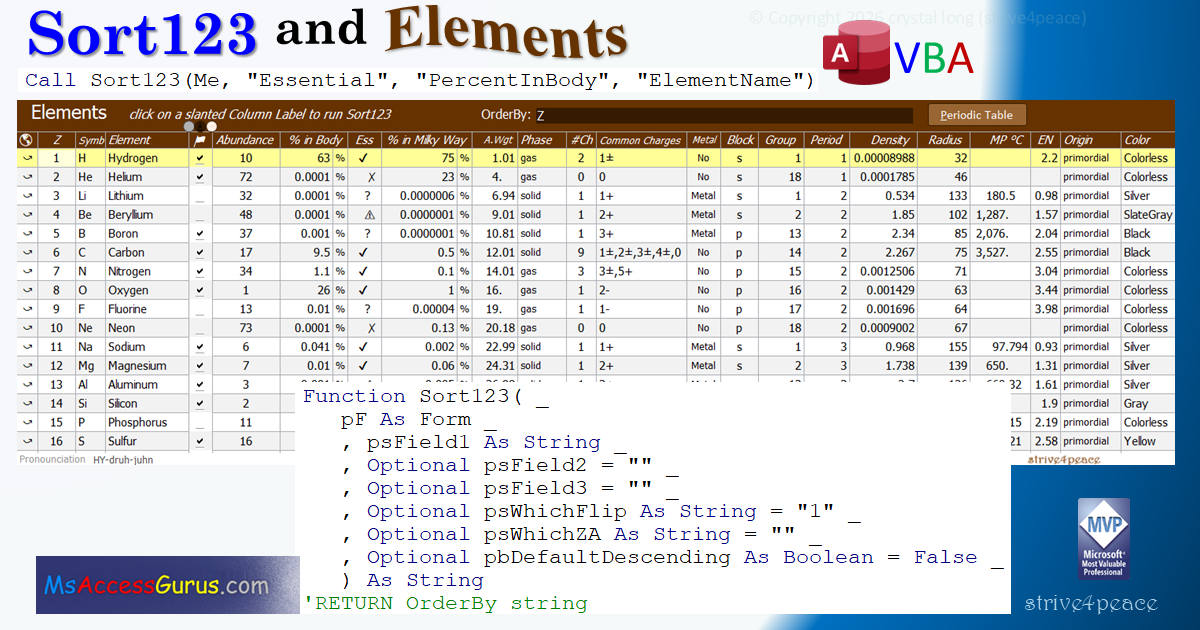
Function Sort123( _
   pF As Form _
   ,psField1 As String _
   ,Optional psField2 =  "" _
   ,Optional psField3 =  "" _
   ,Optional psWhichFlip As String =  "1" _
   ,Optional psWhichZA As String =  "" _
   ,Optional pbDefaultDescending As Boolean = False _
   ) As String
'RETURN OrderBy string

'091203 strive4peace ... 260711,31

   'sort form by specified field(s)
   'sending the same sort fields
   '  toggles Ascending and Descending order

   ' --------------------------------------------------------
   ' PARAMETERS
   '  pF = form reference
   '       if in code behind a form, this is
   '                   Me
   ' --------------------------------------------------------
   '  psField1 -- field name for first sort
   '  psField2 -- optional, field name for second sort
   '  psField3 -- optional, field name for third sort
   '              NOTE
   '  specify FIELD Names in the RecordSource
   '  control names do not matter
   '
   '----------------------- RULES -- optional
   '     "1", "12", "123", "2", "3", etc
   '  psWhichFlip -- string specifying field numbers to flip
   '           between AZ and ZA
   '           when the sort order is reversed
   '           default is the first field only
   '  psWhichZA -- string specifying field numbers that
   '           are always descending
   '           otherwise, if not in psWhichFlip, always ascending
   ' --------------------------------------------------------
   '  pbDefaultDescending ,
   '              False (default) sort ascending first
   '              True is sort descending order first
   ' --------------------------------------------------------
   'USEAGE
   ' commonly called on
   '     CLICK event of column header label control
   '
   ' specify sort 2 fields in code behind a form
   '    Sort123 Me, "Fieldname1", "Fieldname2"
   ' sort by 3 fields in code behind Me
   '    Call Sort123(Me, "Essential", "PercentInBody", "ElementName")
   ' sort by one field and assign the OrderBy string to a control
   '  Me.txtOrderBy = Sort123(Me, "Z")

   'set up Error Handler
   On Error GoTo Proc_Err

   'dimension sort string variables
   ' for both ascending and descending cases
   ' and temp to swap
   Dim sOrder As String _
      ,sOrderZA As String _
      ,sTemp As String

   'sOrder = main sort
   'sOrderZA = alternate sort

   'initialize the OrderBy strings
   sOrder =  ""
   sOrderZA =  ""

   'if first field is "" then remove OrderBy
   If psField1 =  "" Then
      ' no sort string specified
      ' remove OrderBy from the form
      pF.OrderByOn = False
      ' exit the procedure
      GoTo Proc_Exit
   End If

   ' first field
   If InStr(psWhichZA, "1") > 0 Then  'always descending
      sOrder = psField1 &  " desc"
      sOrderZA = psField1 &  " desc"
   Else
      sOrder = psField1
      'reverse sort order
      If InStr(psWhichFlip, "1") > 0 Then
         sOrderZA = psField1 &  " desc"
      Else
         sOrderZA = psField1  'keep ascending
      End If
   End If

   ' second field
   If psField2 <>  "" Then
      If InStr(psWhichZA, "2") > 0 Then  'always descending
         sOrder = sOrder &  ", " & psField2 &  " desc"
         sOrderZA = sOrderZA &  ", " & psField2 &  " desc"
      Else
         sOrder = sOrder &  ", " & psField2
         'reverse sort order
         If InStr(psWhichFlip, "2") > 0 Then
            sOrderZA = sOrderZA &  ", " & psField2 &  " desc"
         Else
            sOrderZA = sOrderZA &  ", " & psField2  'keep ascending
         End If
      End If
   End If

   ' third field
   If psField3 <>  "" Then
      If InStr(psWhichZA, "3") > 0 Then  'always descending
         sOrder = sOrder &  ", " & psField3 &  " desc"
         sOrderZA = sOrderZA &  ", " & psField3 &  " desc"
      Else
         sOrder = sOrder &  ", " & psField3
         'reverse sort order
         If InStr(psWhichFlip, "3") > 0 Then
            sOrderZA = sOrderZA &  ", " & psField3 &  " desc"
         Else
            sOrderZA = sOrderZA &  ", " & psField3  'keep ascending
         End If
      End If
   End If

   If sOrder <>  "" Then
      If pbDefaultDescending <> False Then  'default ZA
         'reverse the sort strings
         'if descending should be the default (first) sort
         sTemp = sOrder  'save to swap
         sOrder = sOrderZA  'main sort
         sOrderZA = sTemp  'alternate sort
      End If
   End If

   With pF
      'apply the sort
      If .OrderBy = sOrder Then  'sorted by main sort
         .OrderBy = sOrderZA  'descending or alternate sort
      Else
         .OrderBy = sOrder  'ascending or main sort
      End If
      Sort123 = .OrderBy  'return the sort order
      ' make the form use the specified sort order
      .OrderByOn = True
   End With

Proc_Exit:
   Exit Function

Proc_Err:
   MsgBox Err.Description _
        ,, "ERROR " & Err.Number _
        &  "   Sort123"
   Resume Proc_Exit
   'if you want to single-step code to find error,
   ' CTRL-Break at MsgBox
   'then set Resume to be the next statement
   Resume

End Function
'*************** Code End *******************************************************
Goto Top
cbf: f_ELEMENTS
Option Compare Database
Option Explicit
'Project Sort Elements s4p

'*************** Code Start *****************************************************
' cbf: f_ELEMENTS
'-------------------------------------------------------------------------------
' Purpose  : Sort by 1, 2, or 3 fields
'            Click Label again to switch between
'              Ascending and Descending
'              and follow sorting rules
' Author   : crystal (strive4peace)
' This code: https://msaccessgurus.com/VBA/Sort123.htm
' LICENSE  :
'   You may freely use and share this code, but not sell it.
'   Keep attribution. Mark your changes. Use at your own risk.
'-------------------------------------------------------------------------------
'================================================ FORM
Private Sub Form_Load()
'260630 sort by Atomic Number (Z), remove filter, show OrderBy
   With Me
      .OrderBy =  "Z"
      .OrderByOn = True
      .FilterOn = False
      .txtOrderBy = .OrderBy
   End With  'me
End Sub
Private Sub Form_Current()
'260724 set hidden control to value of Atomic Number
' for conditional formatting rule on txtHighlightBox
   With Me
      .CurrentID = Nz(.Z,0)
   End With
End Sub
Private Sub Form_BeforeUpdate(Cancel As Integer)
'260729 keep track of when record was changed
'Z, Symb, and Element are Locked
   Me.dtmEdit = Now()
End Sub

'================================================ SORT
Private Sub Label_Z_Click()
'260630 Sort by Atomic Number
   Me.txtOrderBy = Sort123(Me, "Z")
End Sub
Private Sub Label_Symb_Click()
'260630 Sort by Symbol
   Me.txtOrderBy = Sort123(Me, "Symb")
End Sub
Private Sub Label_Element_Click()
'260630 Sort by Element Name
   Me.txtOrderBy = Sort123(Me, "Element")
End Sub
Private Sub Label_Flag_Click()
'260729 Sort by Flag then Element name
   Me.txtOrderBy = Sort123(Me, "Flag", "Element")
End Sub
Private Sub Label_Abund_Click()
'260630 Sort by Abundance with Null last
' then Atomic Number
   Me.txtOrderBy = Sort123(Me, "AbundNullLast", "Z")
End Sub
Private Sub Label_pcBody_Click()
'260726 Sort by % in Body
' then Abundance with Null last then Atomic Number
'start with descending order
   Me.txtOrderBy = Sort123(Me, "pcBody", "AbundNullLast", "Z" _
      ,,,True)
End Sub
Private Sub Label_Ess_Click()
'260726 Sort by Essential rank (Yes, Maybe, No, No!)
' then % in Body always descending
' then Abundance rank with Null last
   Me.txtOrderBy = Sort123(Me, "EssRank", "pcBody", "Element",, "2")
End Sub
Private Sub Label_pcMilky_Click()
'260727 Sort by % in Milky Way Galaxy
' then Abundance with Null last then Atomic Number
'start with descending order
   Me.txtOrderBy = Sort123(Me, "pcMilky", "AbundNullLast", "Z",,,True)
End Sub
Private Sub Label_AtWgt_Click()
'260630 Sort by Atomic Weight then Atomic Number
'flip (reverse) sort for both fields
   Me.txtOrderBy = Sort123(Me, "AtWgt", "Z",, "12")
End Sub
Private Sub Label_NumCh_Click()
'260630 Sort by Number of charges then Common Charges
' then Abundance with Null last
'first sort is in descending order
   Me.txtOrderBy = Sort123(Me, "NumCh", "Charges", "AbundNullLast" _
      ,,,True)
End Sub
Private Sub Label_Charges_Click()
'260711 Sort by Common Charges with Null last
' then Electronegativity then Atomic Number
   Me.txtOrderBy = Sort123(Me, "ChargesNullLast", "EN", "Z")
End Sub
Private Sub Label_Metal_Click()
'260731 Sort by Metal (NonMetal+Both is considered Nonmetal)
'then Common Charges with Null last then Atomic Number
   Me.txtOrderBy = Sort123(Me, "MetalSort", "ChargesNullLast", "Z")
End Sub
Private Sub Label_Phase_Click()
'260630 Sort by Phase then Block then Atomic Number
'reverse sort on Phase and Block
   Me.txtOrderBy = Sort123(Me, "Phase", "Block", "Z", "12")
End Sub
Private Sub Label_Block_Click()
'260630,724 Sort by Block then Essential Rank then Element Name
   Me.txtOrderBy = Sort123(Me, "Block", "EssRank", "Element")
End Sub
Private Sub Label_Grp_Click()
'260630 Sort by Group then Atomic Number
   Me.txtOrderBy = Sort123(Me, "Grp", "Z")
End Sub
Private Sub Label_Period_Click()
'260630,724 Sort by Period then Atomic Number
   Me.txtOrderBy = Sort123(Me, "Period", "Z")
End Sub
Private Sub Label_Density_Click()
'260630 Sort by Density then Atomic Number
   Me.txtOrderBy = Sort123(Me, "Density", "Z")
End Sub
Private Sub Label_RadCov_Click()
'260725 Sort by Atomic Radius then Density
'Reverse both fields when flip
   Me.txtOrderBy = Sort123(Me, "RadCov", "Density",, "12")
End Sub
Private Sub Label_EN_Click()
'260730  Sort by Electronegativity
' then Common Charges with Null last then Atomic Number
   Me.txtOrderBy = Sort123(Me, "EN", "ChargesNullLast", "Z")
End Sub
Private Sub Label_MP_C_Click()
'260711 Sort by Melting Point then Atomic Number
   Me.txtOrderBy = Sort123(Me, "MP_C", "Z")
End Sub
Private Sub Label_Origin_Click()
'260711 Sort by Origin then Atomic Number
   Me.txtOrderBy = Sort123(Me, "Origin", "Z")
End Sub
Private Sub Label_Color_Click()
'260711 Sort by Color then Atomic Number
   Me.txtOrderBy = Sort123(Me, "Color", "Z")
End Sub

'================================================ GoTo
Private Sub LinkGoto_Click()
'260724 open web page with Element information
   Call Shell( "Explorer.exe " & Me.LinkElem _
      ,vbNormalFocus)
End Sub

'================================================ HIGHLIGHT
Private Sub txtHighlightBox_GotFocus()
'260730 set focus to Notes if click on the Highlight control
   Me.NotesE.SetFocus
End Sub

'================================================ REPORTs
Private Sub cmd_PeriodicTable_Click()
'260725 show Periodic Table report
   DoCmd.OpenReport  "r_PeriodicTable_Elements",acViewPreview
End Sub
Private Sub cmd_PeriodicTable_BW_Click()
'260725 show Periodic Table report in Black and White for B&W printing
   DoCmd.OpenReport  "r_PeriodicTable_BW",acViewPreview
End Sub

'================================================ FLAG
Private Sub cmd_ClearFlags_Click()
'260729 clear flags and show all records
   Dim sSQL As String
   Dim sMsg As String
   Dim nCount As Long
   Dim nRecordID As Long

   If MsgBox( "Do you want to clear all the flags?" _
      ,vbYesNo Or vbDefaultButton2 _
      , "Clear Flags") <> vbYes _
   Then
      Exit Sub
   End If

   sSQL =  "UPDATE t_Element " _
      &  " SET Flag = False" _
      &  " WHERE Flag <> False" _
      &  ";"
   With CurrentDb
      .Execute sSQL
      nCount = .RecordsAffected
   End With

   If nCount > 0 Then
      With Me
         nRecordID = .Z
         .FilterOn = False
'         .Requery
         .Recordset.FindFirst  "Z=" & nRecordID
      End With
      sMsg =  "Cleared " & nCount &  " flags"
   Else
      sMsg =  "No flags to clear"
   End If
   MsgBox sMsg,, "Done"
End Sub
Private Sub cmd_FilterFlag_Click()
'260729
   With Me
      .Filter =  "Flag <> False"
      .FilterOn = True
   End With
End Sub
Private Sub cmd_ShowAll_Click()
'260729
   Me.FilterOn = False
End Sub
'*************** Code End *******************************************************
Code was generated with colors using the free
Color Code add-in for Access
Goto Top