VBA
Standard module: mod_aWord_Query_s4p
Option Compare Database  'Ignore Case
Option Explicit  'variables must be declared
'261015,25
'*************** Code Start ***************************************************
' module: mod_aWord_Query_s4p
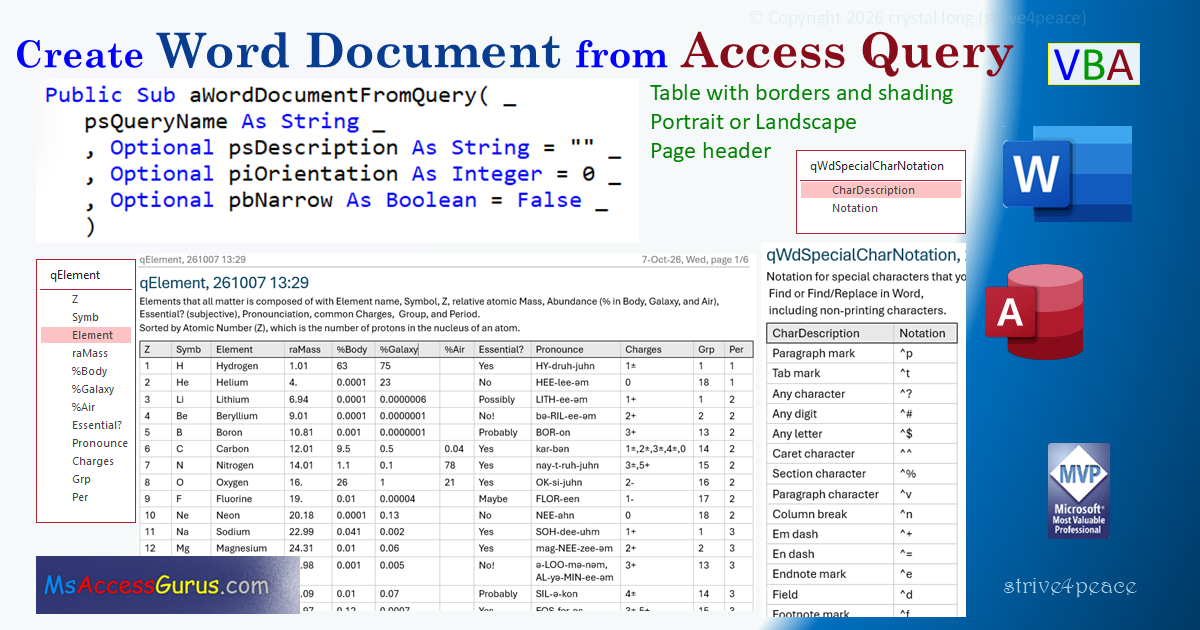
' Purpose  : Automate Word: Create a new Word document from Access Query records
'              new Microsoft Word document with dynamic page header
'                 data shown in Word table with borders + Header Row (shading)
'                 Page header: query name, date/time code, page # and total pages
'              Specify query name
'              Optional:
'                 Description to be written to document before table
'                 Orientation is Portrait unless Landscape specified
'                 Margins can be Narrow
'            progress Status Bar: File, Options, Current Database, Display Status Bar
' Author   : crystal (strive4peace)
' this code: https://msaccessgurus.com/VBA/aWord_NewFromQuery.htm
' LICENSE  :
'   You may freely use and share this code, but not sell it.
'   Keep attribution. Mark your changes. Use at your own risk.
'------------------------
' PROCEDURE
'     aWordDocumentFromQuery
'--------------------------------------- TEST
'     test_aWordDocumentFromQuery_PrimeNumber
'     test_aWordDocumentFromQuery_SpecialChar
'     test_aWordDocumentFromQuery_Element
'     test_aWordDocumentFromQuery_BogusError
'     test_aWordDocumentFromQuery_NoRecordsError
'     test_aWordDocumentFromQuery_CantOpenError
'-------------------------------------------------------------------------------
'-------------------------------------------------------------------------------
'           aWordDocumentFromQuery
'-------------------------------------------------------------------------------
Public Sub aWordDocumentFromQuery( _
   psQueryName As String _
   ,Optional psDescription As String =  "" _
   ,Optional piOrientation As Integer = 0 _
   ,Optional pbNarrow As Boolean = False _
   )
'260930...1014,25 search for CUSTOMIZE to change path where files are written
   'PARAMETERs
   '   psQueryName = name of query with data to show in Word table
   'Optional
   '   psDescription - Text to write above the table
   '   piOrientation - Default = 0 = Portrait.
   '                   Landscape = 1 -- send any number except 0 (zero)
   '   pbNarrow - Default = False. True = set to narrow margins (0.5 inch)

   '-------------------------------------------- object variables
   '------------------------- DAO
   Dim db As DAO.Database
   Dim rs As DAO.Recordset
   '------------------------- choose one
   '------------------------ Late Binding for Word
   Dim oWord As Object   'Word.Application
   Dim oDoc As Object    'Word.Document
   Dim oTable As Object  'Word.Table
   Dim oRange As Object  'Word.Range
   '------------------------ Early Binding for Word
   '  Reference: Microsoft Word #.# Object Library
'   Dim oWord As Word.Application
'   Dim oDoc As Word.Document
'   Dim oTable As Word.Table
'   Dim oRange As Word.Range
   '-------------------------

   'variables
   Dim sMsg As String          'message
   Dim sPath As String         'file path
   Dim sPathFile As String     'file path and file name
   Dim nRow As Long            'current row of table
   Dim nCol As Long            'current column of table
   Dim nRows As Long           'number of data rows
   Dim nColumns As Long        'number of columns
   Dim i As Integer            'integer for counting
   Dim bCloseWord As Boolean   'True to close Word Application

   'setup error handler
   On Error GoTo Proc_Err

   '-------------------------------------------- Open Query
   'make sure we can open the query
   nRows = 0
   '----------- assign db database and rs recordset objects
   On Error Resume Next
   '------------------------ DAO
   Set db = CurrentDb()  'CurrentDb is a function
   'OpenRecordset using Snapshot: loads completely and is read-only
   Set rs = db.OpenRecordset(psQueryName,dbOpenSnapshot)
   '------------------------
   If Err.Number > 0 Then
      'if there's an error then the query can't be opened as a recordset
      sMsg =  "Can't open query: " _
         & vbCrLf & Space(5) & psQueryName
      MsgBox sMsg,, "Can't write results to Word "
      GoTo Proc_Exit  'exit
   End If
   On Error GoTo Proc_Err

   'Count the rows and columns. Do if beginning is not the end
   'EOF stands for End Of File although a recordset isn't a traditional file
   With rs
      If Not .EOF Then
         ' no need to move with Snapshot since it's already loaded
         '.MoveLast 'dynaset must load all to get RecordCount
         '.MoveFirst 'go back to start
         nRows = .RecordCount
         nColumns = .Fields.Count
      End If
   End With

   'don't make Word document if there is no data
   If Not nRows > 0 Then
      MsgBox  "No records in query: " & psQueryName _
         ,, "Can't write results to a Word document"
      GoTo Proc_Exit
   End If

   '-------------------------------------------- Status Bar
   'write progress messages to the Status Bar
   sMsg =  "Creating Word document ..."
   Application.SysCmd acSysCmdSetStatus,sMsg

   '-------------------------------------------- Document path
   '------------------------------ CUSTOMIZE
   'default Path: \QUERY_WordDocuments folder under database path
   sPath = CurrentProject.Path &  "\QUERY_WordDocuments\"
   'create folder if it doesn't exist
   If Dir(sPath,vbDirectory) =  "" Then
      MkDir sPath  'Make Directory
      'Yield execution until after operating system processes other events
      DoEvents  'probably not always necessary
   End If
   '------------------------------

   '-------------------------------------------- Document name
   sPathFile = sPath &  "QUERY_" _
      & psQueryName _
      & Format(Now, "_yymmdd_hhnn") _
      &  ".DOCX"

   '-------------------------------------------- Word Application
   'if Word is already open, use that instance
   'ignore errors because if Word is NOT open, we will get one
   On Error Resume Next
   'make assumption that Word is Open and we won't close it
   bCloseWord = False
   Set oWord = GetObject(, "Word.Application")
   On Error GoTo Proc_Err

   'If oWord doesn't have a value then we need to open Word
   If oWord Is Nothing Then
      'Word was not open -- create a new instance
      Set oWord = CreateObject( "Word.Application")
      'set to close instance
      bCloseWord = True

   End If
'   'make Word visible -- uncomment to watch, comment to run faster
'   'normally this would only be applicable for CreateObject
   oWord.Visible = True

   '-------------------------------------------- New Word Document
   'make a new Word Document
   Set oDoc = oWord.Documents.Add

   '-------------------------------------------- Setup Word
   With oDoc
      'some page setup before writing for better layout
      With .PageSetup
         '0=Portait, 1=Landscape (or any other number)
         .Orientation = IIf(piOrientation = 0,0,1)
         If pbNarrow <> False Then
            'Narrow Margins - set to 0.5 inch
            'distance in points (1"=72 points)
            .LeftMargin = 36
            .RightMargin = 36
            .TopMargin = 36
            .BottomMargin = 36
         End If
      End With  'PageSetup

      '--- Styles - redefine for document
      With .Styles( "Normal")  'Normal
         With .ParagraphFormat
            .SpaceBefore = 2  'points, 72 points/inch
            .SpaceAfter = 2
            .KeepTogether = True  'keep whole paragraph on same page
            .LineSpacingRule = 0  'wdLineSpaceSingle
         End With  'ParagraphFormat Normal
      End With  'Normal Style
      With .Styles( "Heading 1")  'Heading 1
         With .ParagraphFormat
            .SpaceBefore = 0
            .SpaceAfter = 4
         End With  'ParagraphFormat Heading 1
      End With  'Heading 1 Style

      '----------------------------------------- Content
      With .Content
         'Title, initially=query name, edit content in Word if desired
         .InsertAfter psQueryName
         'style as Heading 1 -- reference to content in page header
         .Paragraphs(1).Style = oDoc.Styles( "Heading 1")
         .InsertParagraphAfter  'paragraph mark

         'write description if sent
         If psDescription <>  "" Then
            .InsertAfter psDescription
            'blank line
            .InsertParagraphAfter
         End If

         'write number of rows
         .InsertAfter Format(nRows, "#,##0") &  " Rows"
         'blank line
         .InsertParagraphAfter

      End With  'content

      '----------------------------------------- Make table
'      'range for table, put at end
      Set oRange = .Content
      oRange.Collapse Direction:=0   'wdCollapseEnd

      'insert table +1 row for header row
      Set oTable = .Tables.Add( _
       Range:=oRange _
         ,NumRows:=nRows + 1 _
         ,NumColumns:=nColumns _
         )

   End With  'oDoc

   '-------------------------------------------- Query Data
   With oTable
      '----------------------------------------- Headings
      'column headings -- use query field names
      'change these afterward in Word if desired
      nRow = 1
      For nCol = 1 To nColumns
         .cell(nRow,nCol).Range.Text = rs.Fields(nCol - 1).Name
      Next nCol

      'mark heading row so it repeats across columns and pages
      .Rows(1).HeadingFormat = True
      'dont allow rows to break
      .Rows.AllowBreakAcrossPages = False

      '----------------------------------------- Rows
      'read values 1-by-1 ... slow and gets all values including long text
      Do While Not rs.EOF
         sMsg =  "Writing Row " & nRow &  " of " & nRows
         Application.SysCmd acSysCmdSetStatus,sMsg

         nRow = nRow + 1
         For nCol = 1 To nColumns
            .cell(nRow,nCol).Range.Text = rs.Fields(nCol - 1).Value &  ""
         Next nCol
         rs.MoveNext
      Loop    'rs

      'best-fit columns
      .Columns.AutoFit

      '----------------------------------------- Border lines
      For i = 1 To 6
         'wdBorderTop =-1
         'wdBorderLeft = -2
         'wdBorderBottom =-3
         'wdBorderRight= -4
         'wdBorderHorizontal = -5
         'wdBorderVertical = -6
         With .Borders(-i)
            .LineStyle = 1    'wdLineStyleSingle=1
            .LineWidth = 8   'wdLineWidth100pt=8. wdLineWidth150pt=12
            .Color = RGB(200,200,200)  'medium-light gray
         End With
      Next i

      'change border lines to black for first row + add shading
      With .Rows(1)
         For i = 1 To 4
            With .Borders(-i)
               .Color = 0        'wdColorBlack = 0
            End With
         Next i
         'Shading for header row, light-gray
         .Shading.BackgroundPatternColor = RGB(232,232,232)
      End With   'first row

   End With

   '-------------------------------------------- Header
   ' add after data and update page count
   Set oRange = oDoc.Sections(1).Headers(1).Range   '

   With oRange
      'insert text of Heading 1 style
      'wdFieldEmpty = -1
      .Fields.Add Range:=.Characters.Last _
         ,Type:=-1 _
         ,Text:= "STYLEREF  ""Heading 1"" " _
         ,PreserveFormatting:=False

      'then a TAB and text on right
      .InsertAfter Chr(9) _
         & Format(Now, "d-mmm-yy, ddd hh:nn") _
         &  ", page "

      'then PAGE/NUMPAGES
      '33=wdFieldPage
      'wdFieldEmpty = -1
      .Fields.Add Range:=.Characters.Last _
         ,Type:=-1 _
         ,Text:= "PAGE" '
      .InsertAfter Text:= "/"
      '26=wdFieldNumPages
      .Fields.Add Range:=.Characters.Last _
         ,Type:=-1 _
         ,Text:= "NUMPAGES"

      'add border line below
      With .Borders(-3)   'wdBorderBottom =-3
         .LineStyle = 1    'wdLineStyleSingle=1
         .LineWidth = 8   'wdLineWidth100pt=8
         .Color = RGB(75,75,75)  'dark gray
      End With
      With .ParagraphFormat
         'clear current tabstops
         .TabStops.ClearAll
         'set right-aligned Tab Stop at 10 inches
         '72 points/inch
         'when Position > width, Word displays ok anyway
         '2=wdAlignTabRight
         '0=wdTabLeaderSpaces
         .TabStops.Add _
            Position:=10 * 72 _
            ,Alignment:=2 _
            ,Leader:=0
         '0=Left, 1=Center, 2=Right
         .Alignment = 0   '0=wdAlignParagraphLeft
         'space after paragraph = 6 points
         .SpaceAfter = 6
      End With
      .Fields.Update
   End With   'header

   '-------------------------------------------- Save File
   'delete the output file if it already exists
   'not likely as yymmdd_hhnn in filename
   If Dir(sPathFile) <>  "" Then
      Kill sPathFile
      DoEvents
   End If
   'save Word Document and Close
   With oDoc
      .SaveAs sPathFile
      .Close
   End With

   sMsg =  "Created " & sPathFile
   Application.SysCmd acSysCmdSetStatus,sMsg

   sMsg =  "Done creating a new Word document" _
      & vbCrLf &  "   " & sPathFile

   Debug.Print Now(),sMsg
   sMsg = sMsg & vbCrLf & vbCrLf &  "Open Path?"

   If MsgBox(sMsg,vbYesNo, "Done") <> vbNo Then
      'open path
      Call Shell( "Explorer.exe " & sPath,vbNormalFocus)
   End If

   '-------------------------------------------- Exit
Proc_Exit:
   'cleanup object variables
   On Error Resume Next
   If Not rs Is Nothing Then
      rs.Close
      Set rs = Nothing
   End If
   Set db = Nothing
   Set oRange = Nothing
   Set oTable = Nothing
   Set oDoc = Nothing
   If bCloseWord <> False Then
      oWord.Quit
   End If
   Set oWord = Nothing
   'clear status bar
   Application.SysCmd acSysCmdClearStatus
   'exit before the error handler!
   Exit Sub

Proc_Err:  'error handler
   MsgBox Err.Description _
     ,, "ERROR " & Err.Number _
     &  "   aWordDocumentFromQuery"
   Resume Proc_Exit
   Resume  'Break then set this to be the Next Statement to go to the bad line
End Sub
'========================================================================== TEST
'-------------------------------------------------------------------------------
'           test_aWordDocumentFromQuery_PrimeNumber
'-------------------------------------------------------------------------------
Public Sub test_aWordDocumentFromQuery_PrimeNumber()
'261012
   'CLICK HERE, press F5 to Run!
   'Create Word document from query
   Call aWordDocumentFromQuery( "qPrimeNumber")
End Sub

'-------------------------------------------------------------------------------
'           test_aWordDocumentFromQuery_SpecialChar
'-------------------------------------------------------------------------------
Public Sub test_aWordDocumentFromQuery_SpecialChar()
'261007,14
   'CLICK HERE, press F5 to Run!
   Dim sQueryName As String _
      ,sDescription As String

   sQueryName =  "qWdSpecialCharNotation"
   ' Chr(11) is a manual line break in Word
   sDescription =  "Notation for special characters you can use when you" _
      & Chr(11) &  " Find or Find/Replace in Word," _
      &  " including non-printing characters."

   'Create Word document from query, specify description
   Call aWordDocumentFromQuery(sQueryName,sDescription)
End Sub

'-------------------------------------------------------------------------------
'           test_aWordDocumentFromQuery_Element
'-------------------------------------------------------------------------------
Public Sub test_aWordDocumentFromQuery_Element()
'261007,14
   'CLICK HERE, press F5 to Run!
   Dim sQueryName As String _
      ,sDescription As String

   sQueryName =  "qElement"

   'vbCrLf is Carriage Return + Line Feed and creates a paragraph mark
   sDescription =  "Elements that all matter is composed of with" _
      &  " Element name, Symbol, Z (#Protons), relative atomic Mass," _
      &  " Abundance (% in Body, Galaxy, and Air)," _
      &  " Essential (subjective)?, Pronounciation, common Charges, " _
      &  " Group and Period on Periodic Chart." _
      & vbCrLf _
      &  "Sorted by Atomic Number (Z)," _
      &  " which is the number of protons in the nucleus of an atom." _
      & vbCrLf

   'Create Word document, specify query, description, Landscape, Narrow margins
   '1=Landscape (wide), True=Narrow margins
   Call aWordDocumentFromQuery(sQueryName _
      ,sDescription _
      ,1,True)
End Sub

'-------------------------------------------------------------------------------
'           test_aWordDocumentFromQuery_BogusError
'-------------------------------------------------------------------------------
Public Sub test_aWordDocumentFromQuery_BogusError()
'260930
   'CLICK HERE, press F5 to Run!
   Dim sQueryName As String _
      ,sDescription As String

   sQueryName =  "Bogus Query name"

   'Create Word document -- error since query doesn't exist
   Call aWordDocumentFromQuery(sQueryName,sDescription)
End Sub
'-------------------------------------------------------------------------------
'           test_aWordDocumentFromQuery_NoRecordsError
'-------------------------------------------------------------------------------
Public Sub test_aWordDocumentFromQuery_NoRecordsError()
'260930
   'CLICK HERE, press F5 to Run!
   Dim sQueryName As String _
      ,sDescription As String

   sQueryName =  "qNoRecords" 'Query doesn't have records

   'Create Word document -- error since query doesn't have records
   Call aWordDocumentFromQuery(sQueryName,sDescription)
End Sub

'-------------------------------------------------------------------------------
'           test_aWordDocumentFromQuery_CantOpenError
'-------------------------------------------------------------------------------
Public Sub test_aWordDocumentFromQuery_CantOpenError()
'261010
   'CLICK HERE, press F5 to Run!
   Dim sQueryName As String _
      ,sDescription As String

   sQueryName =  "qTempBadName" 'Query has a bad field name

   'Create Word document -- error since query can't open
   Call aWordDocumentFromQuery(sQueryName,sDescription)
End Sub

'*************** Code End *******************************************************
Code was generated with colors using the free
Color Code add-in that runs in Access