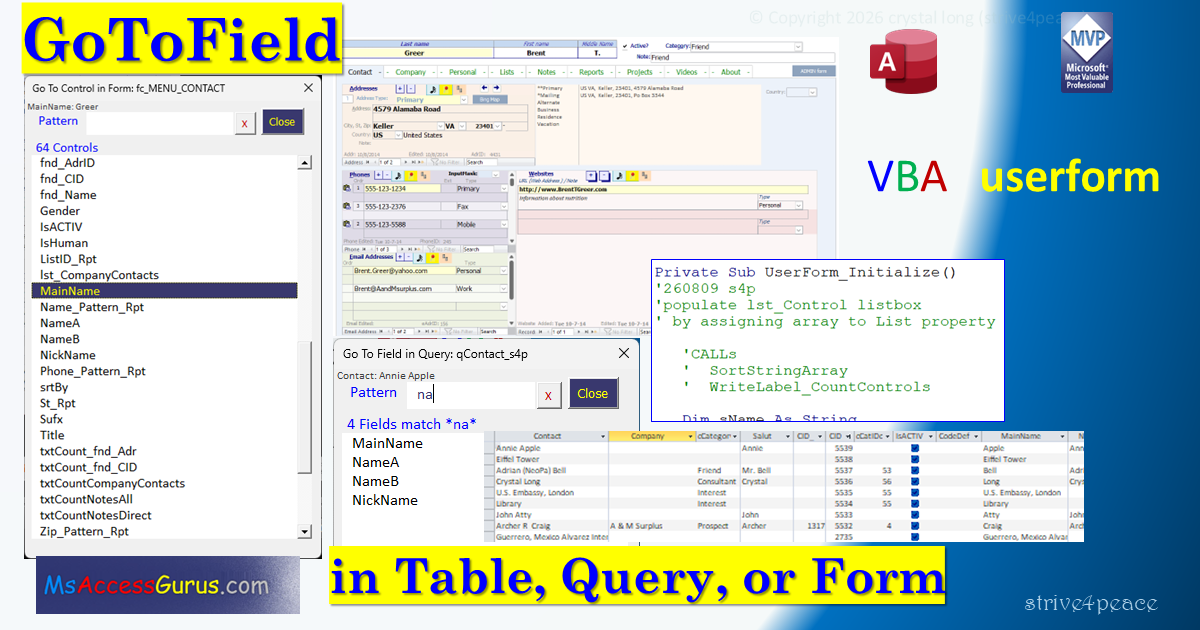
Notes
Import Userform and Module
After unzipping and unblocking,
press Alt-F11 to go to the Visual Basic Editor.
From the menu, choose File, Import
- uform_GoToField_s4p.frm
uform_GoToField_s4p.frx will come with it automatically
- mod_uform_GoToField_Show.bas
with code to show the userform
After importing both files, there will be 3 more objects.
From the menu,
Debug,
Compile, and
Save.
Run
Launch GoToField when you have a table, query, or form open.
Here are a few ways you can do it:
- Run this from the Immediate window or VBA:
uform_GoToField_s4p.Show
- Make a macro to run code that opens the GoToField userform
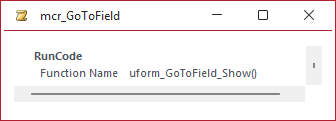
- Add a button to your QAT or ribbon to run the macro.
- Assign a shortcut key using AutoKeys to run the macro.
VBA
- code behind userform: userform_GoToField_s4p
- module: mod_uform_GoToField_Show
code behind userform: userform_GoToField_s4p
Option Explicit
Option Compare Database  'upper=lower case
'260813
'
'*************** Code Start *****************************************************
' code behind userform: userform_GoToField_s4p
'-------------------------------------------------------------------------------
' Purpose  : Go To Field or Control for active datasheet or form in Access
'              filter name by pattern using Wildcards
'              set focus to selected Field or Control
' Author   : crystal (strive4peace)
' This tool: https://msaccessgurus.com/tool/Userform_GoToField.htm
' LICENSE  :
'   You may freely use and share this code, but not sell it.
'   Keep attribution. Mark changes. Use at your own risk.
'------------------------------------------------------------------------------
'           to Run!
'------------------------------------------------------------------------------
' 1. in the Form Explorer, select:  userform_GoToField_s4p
'        press F5 to Run!
'        or from the menu, choose Run, Run Sub/UserForm
' OR 2. in VBA or Immediate window:    uform_GoToField_s4p.Show
'------------------------------------------------------------------------------
'                       Module declarations
'------------------------------------------------------------------------------
Private masControlName() As String  'Control/Field name array
Private moForm As Form  'Active datasheet or form
Private moControl As Control

Private msFormName As String
Private mnCountControl As Long
Private msFieldControl As String  ' "Field" or "Control"
Private msTypeName As String

Dim mbDatasheetView As Boolean

Private Const HIDDENPREFIX As String =  "zzHidden: "
Private Const NOTVISIBLEPREFIX As String =  "zzNotVisible: "
Private Const NOTinDETAILPREFIX As String =  "zzNotInDetail: "
Private Const NOTENABLEDPREFIX As String =  "zzNotEnabled: "
Private Const NOFOCUSPREFIX As String =  "zzNoFocus: "

'------------------------------------------------------------------------------
'                       UserForm_Initialize
'------------------------------------------------------------------------------
Private Sub UserForm_Initialize()
'260809 s4p
'populate lst_Control listbox
' by assigning array to List property

   'CALLs
   '  SortStringArray
   '  WriteLabel_CountControls
   '  HasProperty

   Dim sName As String
   Dim sNames As String
   Dim sTemp As String
   Dim sFormCaption As String

   Dim sObjectType As String
   Dim sActiveControlName As String
   Dim sValue As String

   On Error Resume Next
   Set moForm = Application.Screen.ActiveDatasheet
   If Err.Number > 0 Then
      Err.Clear
      Set moForm = Application.Screen.ActiveForm
      If Err.Number > 0 Then
         Err.Clear
         MsgBox  "There is no active datasheet or form" _
            ,, "Can't go to field"
         Unload Me
      End If
   End If

   On Error GoTo Proc_Err
   sValue =  ""
   sActiveControlName =  ""
   With moForm
      msFormName = .Name
      Select Case .CurrentView
      Case 0  'design
         MsgBox  "In Design View" _
            ,, "Can't go to field"
         Unload Me
         GoTo Proc_Exit
      Case 2  'datasheet
         mbDatasheetView = True
      Case 1,7  'form or layout
         mbDatasheetView = False
      End Select

      On Error Resume Next
      With .ActiveControl
         sActiveControlName = .Name
         sValue = .Value
      End With
      On Error GoTo Proc_Err
   End With  'moForm

   'see if Table, Query, or Form
   msTypeName = TypeName(moForm)
   If Left(msTypeName,5) <>  "Form_" Then
      msFieldControl =  "Field"
      If Left(msTypeName,2) =  "T_" _
         And Left(msFormName,2) <>  "T_" _
      Then
         sObjectType =  "Table"
      Else
         sObjectType =  "Query"
      End If
   Else
      msFieldControl =  "Control"
      sObjectType =  "Form"
   End If

   sFormCaption =  "Go To " & msFieldControl &  " in " _
      & sObjectType &  ": " & msFormName

   Me.Caption = sFormCaption

   ' ------------------------------------------------------ Names
   ' create a string of all names
   'delimited with comma ,
   For Each moControl In moForm.Controls
      '
      'and is visible (form) or column isn't hidden (datasheet)
      With moControl
         sName =  ""
         If mbDatasheetView Then
            If HasProperty(moControl, "ControlSource") Then
               sName = .Name
               If .ColumnHidden <> False Then
                  sName = HIDDENPREFIX & sName
               ElseIf Not .Enabled <> False Then
                  sName = NOTENABLEDPREFIX & sName
               ElseIf sObjectType =  "Form" Then  'Datasheet form
                  If .Section <> 0 Then  'not in Detail
                     sName = NOTinDETAILPREFIX & sName
                  End If
               End If
            End If
         Else  'form
            ' include if it has a ControlSource or SourceObject
            If HasProperty(moControl, "ControlSource") _
               Or HasProperty(moControl, "SourceObject") _
            Then
               sName = .Name
               If Not .Visible <> False Then
                  sName = NOTVISIBLEPREFIX & sName
               Else
                  If Not HasProperty(moControl, "Enabled") Then
                     'image or other control that can't take the focus
                     sName = NOFOCUSPREFIX & sName
                  ElseIf Not .Enabled Then
                     sName = NOTENABLEDPREFIX & sName
                  End If
               End If
            End If
         End If
         If sName <>  "" Then
            sNames = sNames &  "," & sName
         End If

      End With  'moControl
   Next moControl

   If sNames <>  "" Then
      'remove beginning comma
      sNames = Mid(sNames,2)
   End If

   ' --------------------------------------------------------- Array
   masControlName = Split(sNames, ",")

   mnCountControl = UBound(masControlName) _
                  - LBound(masControlName) + 1

   ' sort array by name
   Call SortStringArray(masControlName)

   'assign Label_NumControls.Caption
   Call WriteLabel_CountControls(mnCountControl)

   ' --------------------------------------------------------- Listbox
   With Me.lst_Control
      ' populate listbox with results
      .List = masControlName
      'set value to active control
      On Error Resume Next
      .Value = sActiveControlName
   End With
   Me.Label_Value = sActiveControlName &  " : " & sValue

Proc_Exit:
   Exit Sub

Proc_Err:
   MsgBox Err.Description _
     ,, "ERROR " & Err.Number _
     &  "  UserForm_Initialize : " & Me.Name

   Resume Proc_Exit
   Resume

End Sub
'------------------------------------------------------------------------------
'                       UserForm_Terminate
'------------------------------------------------------------------------------
Private Sub UserForm_Terminate()
'260807
   Set moControl = Nothing
   Set moForm = Nothing
End Sub
'------------------------------------------------------------------------------
'                       cmd_Close_Click
'------------------------------------------------------------------------------
Private Sub cmd_Close_Click()
'260806
'   Set moControl = Nothing
'   Set moForm = Nothing
   Unload Me
End Sub
'------------------------------------------------------------------------------
'                       HasProperty
'------------------------------------------------------------------------------
Private Function HasProperty(poControl As Control _
   ,psPropertyName As String _
   ) As Boolean
'260809 s4p
   HasProperty = False
   On Error GoTo Proc_Err
   Dim vValue As Variant
   vValue = poControl.Properties(psPropertyName).Value
   HasProperty = True
Proc_Exit:
   Exit Function

Proc_Err:
   Resume Proc_Exit
   Resume
End Function
' -------------------------------------------------------------------
'                       Go to selected Field or Control
' -------------------------------------------------------------------
Private Sub lst_Control_DblClick( _
   ByVal Cancel As MSForms.ReturnBoolean)
'260808 Goto field/control and unload
   If GoToField <> False Then
      Unload Me
   End If
End Sub

Private Sub lst_Control_Click()
'260808 Goto field/control
   Call GoToField
End Sub

Private Function GoToField() As Boolean
'260808 set focus to selected field or control
   Dim sName As String

   GoToField = False

   With Me.lst_Control
      If IsNull(.Value) Then Exit Function  'shouldn't happen
      sName = .Value
      If sName Like  "zz*: *" Then
         MsgBox  "Can't set focus to this" _
            ,, "Can't go to field or control"
         Exit Function
      End If
   End With

   'select control
   moForm.Controls(sName).SetFocus

   GoToField = True

End Function
'------------------------------------------------------------------------------
'                       show number of Fields or Controls
'------------------------------------------------------------------------------
Private Sub WriteLabel_CountControls(pnNumberItems As Long _
   ,Optional psPattern As String =  "")
'260806
   Dim sLabel As String

   sLabel = Format(pnNumberItems, "#;;\N\o") &  " " & msFieldControl _
      & IIf(pnNumberItems <> 1, "s", "")
   If psPattern <>  "" Then
      sLabel = sLabel &  " match" _
      & IIf(pnNumberItems <> 1, " ", "es ") & psPattern
   End If
   Me.Label_NumFields.Caption = sLabel
End Sub
'------------------------------------------------------------------------------
'                       Pattern
'------------------------------------------------------------------------------
Private Sub cmd_ClearPattern_Click()
'260807 s4p
   Dim nCount As Long
   Me.txt_Pattern =  ""
   'assign combo list to an array
   Me.lst_Control.List = masControlName
   'update label caption for count Controls
   nCount = UBound(masControlName) - LBound(masControlName) + 1
   Call WriteLabel_CountControls(nCount)
   'set focus to Pattern control
   Me.txt_Pattern.SetFocus
End Sub

'~~~~~~~~~~~~~~~~~~ txt_Pattern_Change
Private Sub txt_Pattern_Change()
'260808
   'new array for list with Control names that match pattern
   '  asMatchnames
   ' based on masControlName

   Dim nMatch As Long _
      ,n As Long _
      ,sPattern As String _
      ,sName As String _
      ,sNames As String

   Dim asMatchnames() As String

   With Me.txt_Pattern
      sPattern = .Value &  ""
      If Not Len(sPattern) > 0 Then
         Me.lst_Control.List = masControlName
         Call WriteLabel_CountControls(mnCountControl)
         Exit Sub
      End If
      sPattern =  "*" & sPattern &  "*"
   End With

   'loop array and load what matches to asMatchnames
   nMatch = 0
   sNames =  ""
   For n = LBound(masControlName) To UBound(masControlName)
      sName = masControlName(n)
      If sName Like sPattern Then
         nMatch = nMatch + 1
         sNames = sNames &  "," & sName
      End If
   Next n

   If sNames <>  "" Then
      'remove beginning ,
      sNames = Mid(sNames,2)
   End If
   asMatchnames = Split(sNames, ",")

   Me.lst_Control.List = asMatchnames

   Call WriteLabel_CountControls(nMatch,sPattern)

End Sub
'------------------------------------------------------------------------------
'                       SortStringArray
'------------------------------------------------------------------------------
Public Sub SortStringArray(ByRef pArray() As String)
'Sorts a single element string array
'200724 strive4peace ... 251031
'based on bubble-sort code originally written by Brent Spaulding

   Dim sValue As String
   Dim i As Integer  'array element
   Dim j As Long  'array upper bound

   'Bubble sort the array
   If UBound(pArray) > 0 Then
      j = UBound(pArray)
      'loop through process for as many elements as there are
      Do Until j = 0
         'start with next to last element
         'if it is greater, then swap them
         For i = LBound(pArray) To j - 1
            If pArray(i) > pArray(i + 1) Then
               sValue = pArray(i)
               'rewrite element in first array
               pArray(i) = pArray(i + 1)
               pArray(i + 1) = sValue

            End If
         Next i
         j = j - 1
      Loop
   End If

End Sub
'*************** Code End *****************************************************
Made with Color Code add-in posted on http://msaccessgurus.com/tool/Addin_ColorCode.htm